Product anatomy / Complete edition
The feature atlas.
Not the brochure.
Ten connected systems. The records, calculations, routines, outputs, roles, and integration boundaries that make each one useful.
Portfolio structure
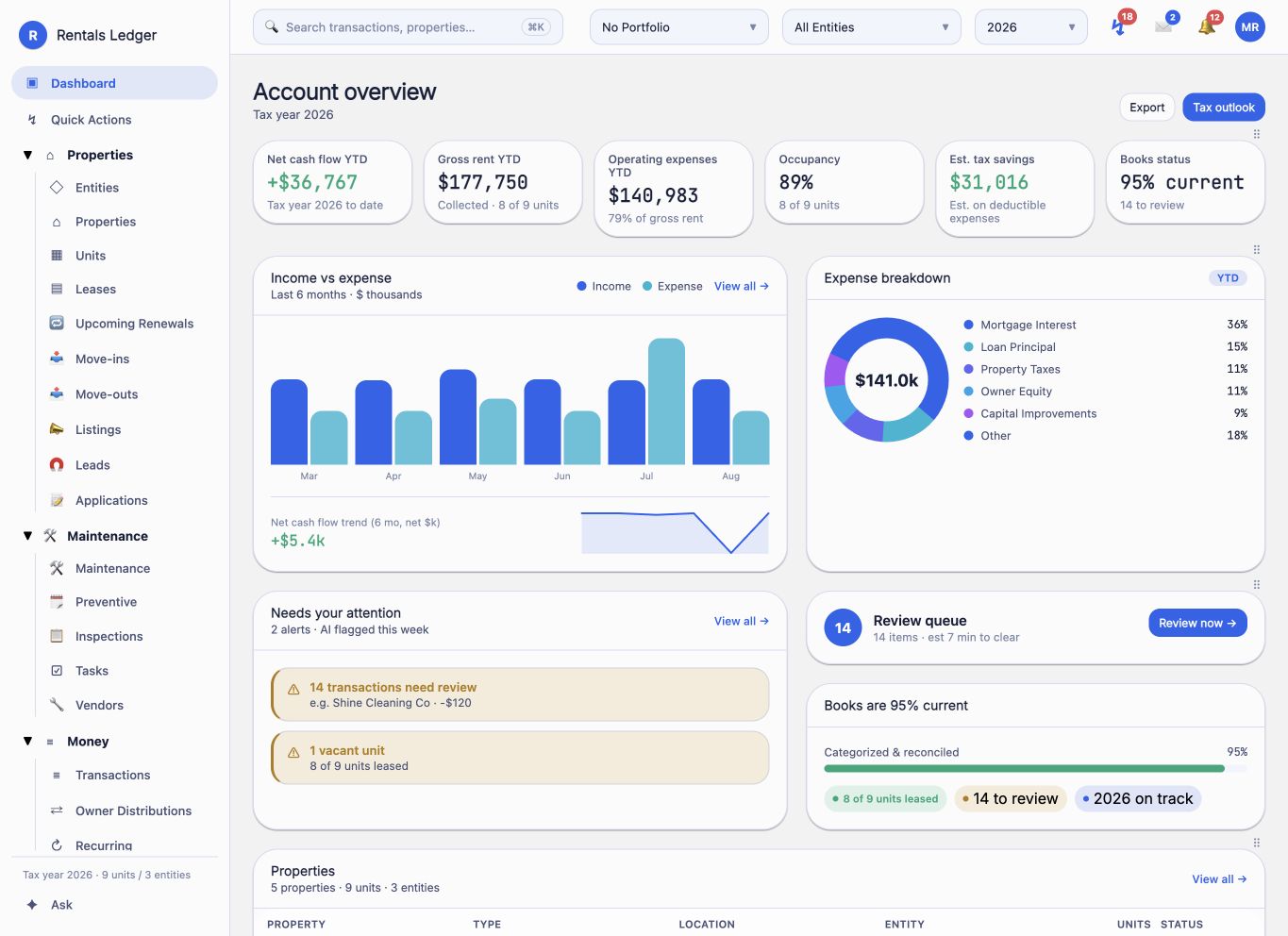
Model the ownership behind every door.
Rentals Ledger keeps account, portfolio, legal, physical, and financing structure separate enough to be correct—and connected enough to operate as one system.
- 01↗
Accounts and portfolios
Scope work to the account and Entity Portfolio that actually owns or manages the records.
- 02↗
Legal entities and owners
Represent entities, ownership relationships, and owner allocations instead of flattening them into property tags.
- 03↗
Properties and units
Keep property details, unit mix, occupancy, leasing, maintenance, and financial history connected.
- 04↗
Loans and amortization
Store financing terms, split principal and interest, and inspect payoff and equity over time.
- 05↗
Appliances and asset context
Attach appliance and equipment history to the unit where maintenance and replacement decisions happen.
- 06↗
Opening balances
Establish the starting financial position when a real portfolio enters the system.
- 07↗
Bulk onboarding
Use workbook-driven imports for portfolio, contact, lease, and accounting setup.
- 08↗
Search and scope controls
Search across operational records while filtering the active portfolio, entity, and tax year.
Acquisition intelligence
Underwrite the asset before it enters the books.
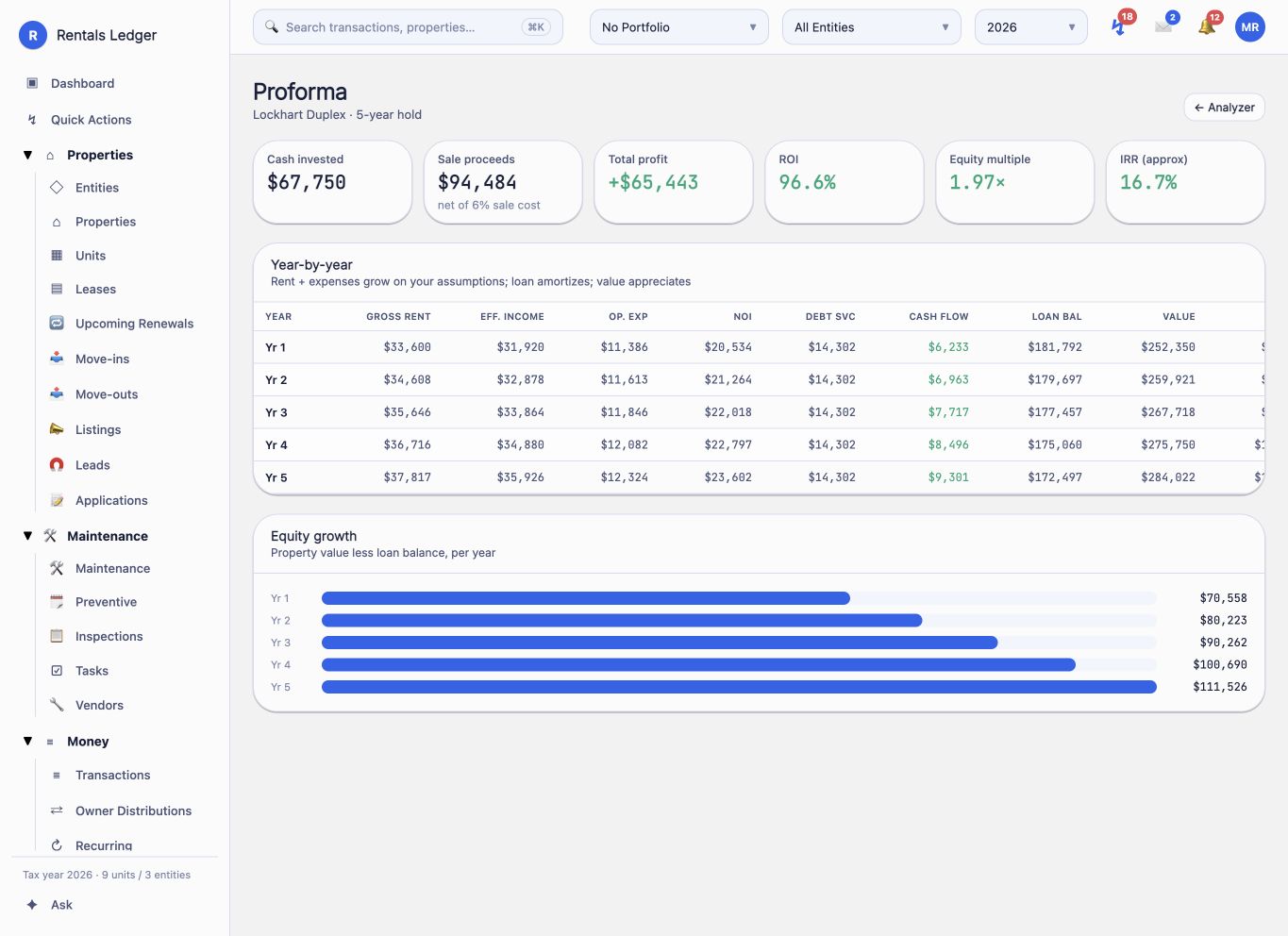
A buy-side investment suite carries an opportunity from early analysis through a five-year operating thesis, comparison, and acquisition decision.
- 01↗
Deal pipeline
Track opportunities by stage, investment strategy, address, price, and the returns that matter before an offer.
- 02↗
Strategy-aware inputs
Model buy-and-hold, BRRRR, flip, and short-term approaches with purchase, rehab, rent, expense, debt, and exit assumptions.
- 03↗
Core returns
Calculate NOI, cap rate, cash-on-cash, monthly and annual cash flow, GRM, DSCR, and total ROI.
- 04↗
Advanced returns
Inspect IRR, equity multiple, return on equity, debt yield, break-even ratio, operating-expense ratio, and rent-to-value.
- 05↗
Rehab and refinance
Build a rehab budget with contingency, ARV, holding costs, 70% rule / maximum allowable offer, and BRRRR cash-left-in or cash-out.
- 06↗
Five-year pro forma
Project revenue, expenses, NOI, debt service, cash flow, property value, loan balance, and equity year by year.
- 07↗
Comps and sensitivity
Work with rent and sales comparables, adjustments, exit cap assumptions, and what-if scenarios.
- 08↗
Compare and communicate
Place up to three opportunities side by side and create a shareable deal report from the same analysis.
Leasing and residents
Carry a vacancy all the way to an active lease.
The leasing chain stays intact from marketing and lead intake through application review, lease activation, recurring charges, renewal, and turnover.
- 01↗
Listings
Create unit-linked listing records with rent, availability, amenities, media, and public-facing details.
- 02↗
Lead pipeline
Track source, stage, assigned agent, activity, and conversion from active prospect to resident.
- 03↗
Public applications
Collect applicants, occupants, pets, vehicles, employment, references, and supporting information.
- 04↗
Application review
Move an application through a review lifecycle and hand off to screening when a configured provider is available.
- 05↗
Leases and participants
Manage terms, tenants, occupants, rent, deposits, documents, status, and the unit relationship.
- 06↗
Recurring lease activity
Schedule rent, charges, and credits and preserve their account mapping for the ledger.
- 07↗
Renewals and compliance
See upcoming expirations, model renewal decisions, and monitor tenant-insurance status.
- 08↗
Moves and turnover
Coordinate move-in and move-out milestones, inspections, photos, deposit context, and unit readiness.
Maintenance and vendors
Turn a request into accountable work.
Maintenance is handled as an asset workflow with triage, execution, cost, communication, and historical context—not merely a shared inbox.
- 01↗
Request intake
Receive owner, manager, or tenant requests with property, unit, urgency, description, and status.
- 02↗
Triage and assignment
Move requests through a working queue and connect the right manager, task, or vendor.
- 03↗
Work orders
Define scope, vendor, schedule, approval state, cost, and the bill that follows the completed job.
- 04↗
Bids and invoices
Keep vendor proposals, approvals, invoices, and payment context close to the work.
- 05↗
Preventive schedules
Create recurring upkeep schedules and generate the next request while retaining completion history.
- 06↗
Inspections
Use inspection records and checklists for moves, periodic reviews, and property condition history.
- 07↗
Tasks and recurrence
Assign one-off or repeating tasks across operational records and due dates.
- 08↗
Files and conversations
Attach photos and documents and preserve messages beside the request or job they concern.
Money and accounting
Real books, grounded in real operations.
A double-entry foundation keeps every charge, receipt, bill, expense, transfer, adjustment, and owner movement tied to the correct property and entity.
- 01↗
Double-entry ledger
Post debits and credits through a chart of accounts designed for rental-property activity.
- 02↗
Transaction review
Categorize activity, assign property and entity context, resolve exceptions, and inspect the underlying source.
- 03↗
Recurring activity
Schedule tenant charges and credits plus vendor bills and expenses with reusable account mappings.
- 04↗
Bank reconciliation
Compare book activity with statement activity and track cleared, outstanding, and unresolved items.
- 05↗
Balanced journals
Post manual year-end adjustments and reclassifications through server-enforced balanced entries.
- 06↗
Receivables and payables
Track tenant balances, deposits, vendor bills, approvals, payments, and aging.
- 07↗
Budgets and cash planning
Build budgets, inspect monthly or YTD variance, and forecast future operating cash.
- 08↗
Owner and asset money
Handle distributions, available funds, loans, amortization, mileage, and property-level return context.
Owners and property management
Keep ownership economics visible and managed work scoped.
The system distinguishes the asset owner, the operating team, the legal entity, and the management company so each workflow lands in the right book and the right experience.
- 01↗
Ownership allocations
Keep owner relationships and shares beside the entities and activity they govern.
- 02↗
Available funds
Review the cash available for owner distributions before money is moved.
- 03↗
Distribution workflow
Prepare, record, and report owner distributions from the relevant entity context.
- 04↗
Owner statements
Review monthly entity performance and owner allocations before delivery.
- 05↗
Managed portfolio scope
Let a property-management company work inside the selected owner and portfolio boundary.
- 06↗
Fees and trust context
Surface management fees, owner books, trust workflows, and related reporting together.
- 07↗
Owner onboarding
Use a guided routine to gather structure, access, properties, and the records needed to begin management.
- 08↗
Monthly owner close
Move from reconciled activity through review, statement preparation, and distribution readiness.
Reporting engine
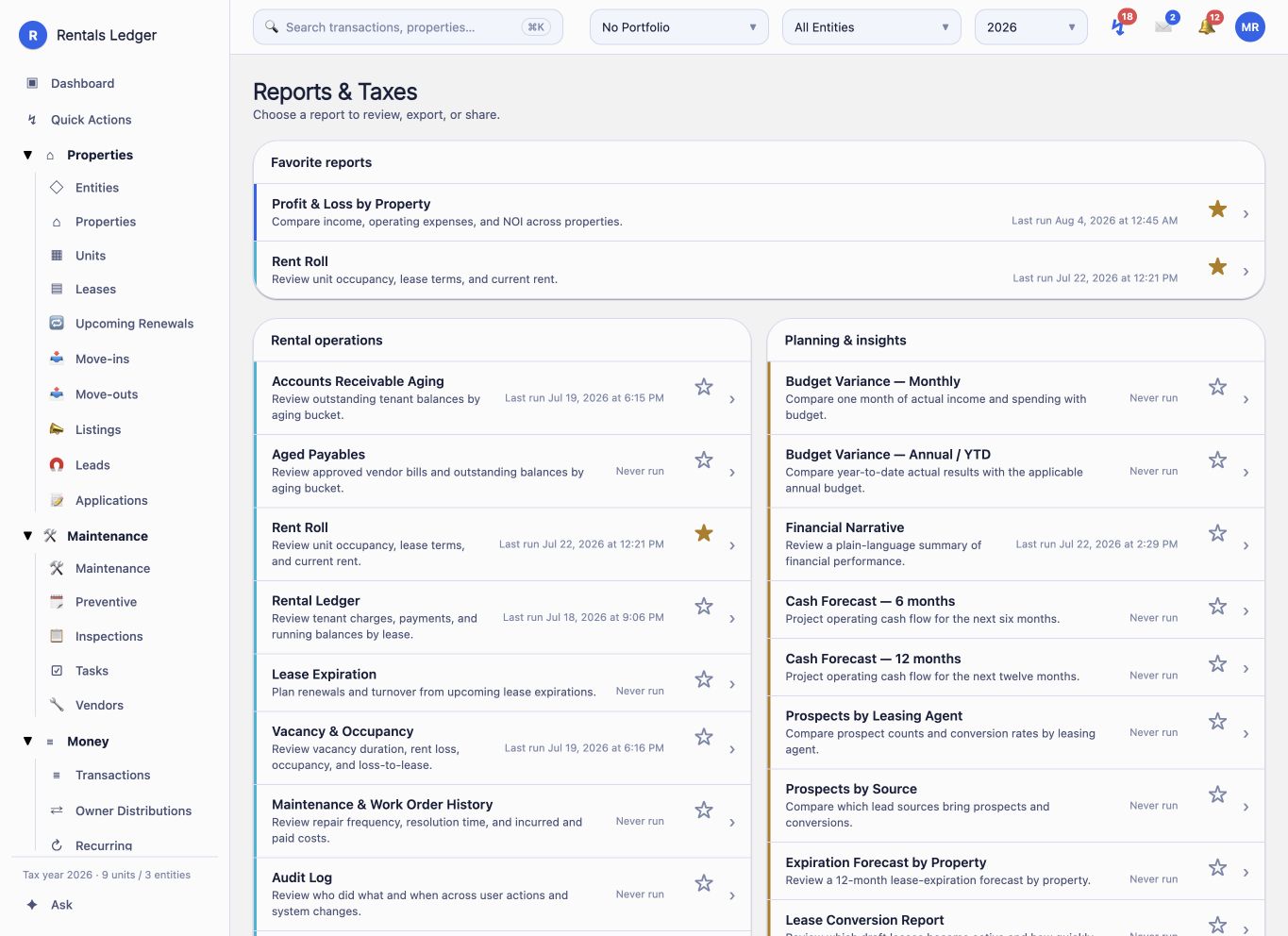
Ninety-nine report definitions. One financial spine.
Financial, operational, planning, ownership, and tax views share the same scoped records rather than rebuilding the truth for every new answer.
- 01↗
Financial statements
P&L variants, balance sheet, cash flow, trial balance, general ledger, and transaction detail.
- 02↗
Rental operations
Rent roll, rental ledger, occupancy, lease expiration, renewals, tenant activity, deposits, and exceptions.
- 03↗
Receivables and payables
AR and AP aging, cash receipts, vendor transactions, outstanding bills, and payment registers.
- 04↗
Maintenance and tasks
Work-order history, recurring maintenance, requests, jobs, costs, and completion context.
- 05↗
Leasing performance
Prospects by source or agent, conversion, renewal rate, signing pipeline, and expiration forecasts.
- 06↗
Planning and ownership
Budgets, forecasts, property comparisons, owner statements, available funds, and distributions.
- 07↗
Common report behavior
Apply portfolio, entity, property, lease, account, date, and tax-year context through a reusable engine.
- 08↗
Drill and export
Move from summary to the source records behind the number, then use PDF or spreadsheet export paths where supported.
Tax readiness
Build the tax context during the year.
Tax tools organize and explain rental activity for review and CPA handoff. Rentals Ledger supports preparation; it does not claim to file a tax return for you.
- 01↗
Schedule E
Review rental income and expense mapped to Schedule E lines, including property-by-property comparison.
- 02↗
Form 8825
Review rental activity for partnership and S-corporation entities.
- 03↗
Depreciation register
Maintain fixed assets and inspect their MACRS depreciation schedules.
- 04↗
Repair or capitalize
Use a classification aid for de minimis treatment and improvement indicators before final professional review.
- 05↗
1099 review
Inspect vendor and owner payment exposure that may require information returns.
- 06↗
Estimated tax
Estimate quarterly payment context from projected rental income.
- 07↗
Pre-file review
Check the books for missing or inconsistent information before tax preparation begins.
- 08↗
CPA binder
Assemble statements and transaction data into a year-end handoff package for the accountant.
Guided operating routines
Make the important repeatable without making it generic.
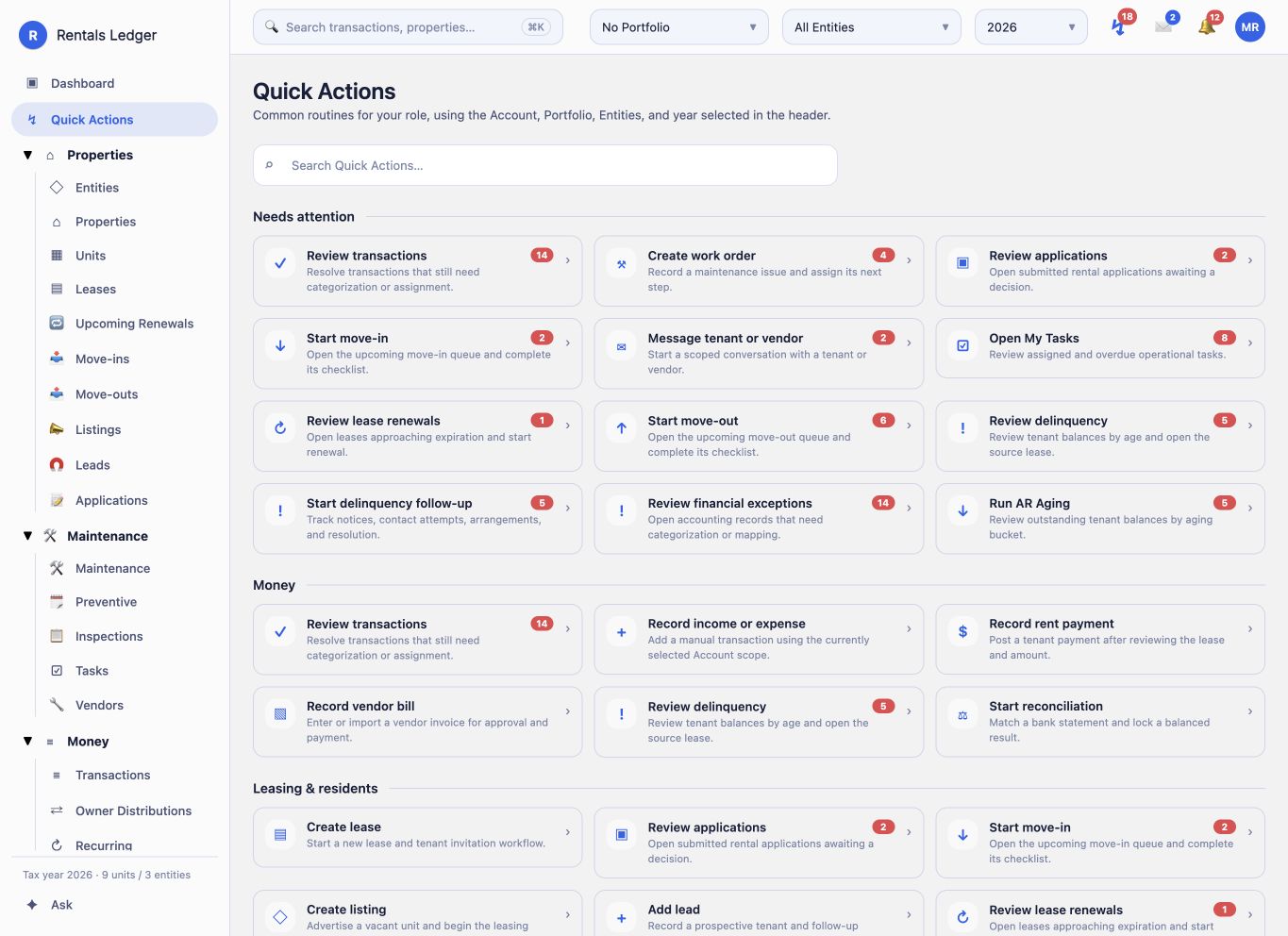
Quick Actions combines live attention signals with structured routines, giving each role a practical next step instead of another dashboard to interpret.
- 01↗
Needs attention
Bring transaction review, expiring leases, vacancy, overdue work, compliance, and other actionable signals into one queue.
- 02↗
Month-end close
Work through recurring activity, transaction review, reconciliation, reporting, and completion checkpoints.
- 03↗
Year-end tax close
Move from book review through depreciation, 1099 exposure, tax reports, and CPA package preparation.
- 04↗
Property onboarding
Structure a new asset, units, financing, opening information, and operational readiness.
- 05↗
Lease-up
Coordinate listing, lead, application, approval, lease, charges, and move-in readiness.
- 06↗
Unit turnover
Connect move-out, inspection, maintenance, disposition, marketing, and the next tenancy.
- 07↗
Portfolio health
Review occupancy, leases, operations, books, risks, and performance across the active scope.
- 08↗
Owner routines
Guide owner onboarding, monthly owner close, statement readiness, and managed-portfolio review.
Roles, portals, and trust
The interface changes with the responsibility.
Owners, managers, accountants, tenants, vendors, and property-management companies share one data model while route and action authority remains deliberately scoped.
- 01↗
Owner experience
Full portfolio, investment, operational, financial, tax, billing, and access administration.
- 02↗
Manager experience
Operational execution within the portfolio and permissions the owner grants.
- 03↗
Accountant experience
Financial and tax visibility plus controlled journal-adjustment workflows.
- 04↗
Tenant portal
A plain-language home for balance and payment access, lease details, requests, messages, and actions.
- 05↗
Vendor portal
A focused workspace for jobs, bids, invoices, messages, and vendor account details.
- 06↗
PM-company experience
Managed owner scope, statements, fees, trust work, communications, and distributions.
- 07↗
Database-backed authority
Row-level policies, permission snapshots, and route guards enforce access beyond cosmetic navigation.
- 08↗
Authentication and evidence
TOTP multi-factor authentication, activity history, and signed-event verification strengthen sensitive workflows.
Integration honesty
Core product first. Provider features when configured.
These capabilities are present in the source, but their live availability depends on server credentials, environment setup, and rollout gates.
Bank data
Bank-feed connections require an enabled provider and valid server configuration.
Payments
Rent and billing payment rails depend on the configured payment environment.
Leasing services
Screening, e-signature, syndication, and SMS appear only behind their rollout gates.
Connected intelligence
AI and accounting-provider connections are optional services—not assumed core behavior.
The live product